Public sample report: This illustrative sample uses illustrative public-safe HarborPoint Foundation Repair data. Real customer reports use the customer website and approved public or owner-provided evidence.
Tool & Tally · Turn Visitors Into Customers
Level 2: Fix Plan Add-on
A website-provider handoff for HarborPoint Foundation Repair: owner tasks, website-person tasks, exact wording, layout instructions, acceptance checks, and retest steps.
Paid Customer ReportHarborPoint Foundation Repair2026-05-15
Scope and safety: Work basis: public pages were checked from visible website evidence only. No forms were submitted, no phone call was made, no chat was opened, and no outreach was sent. This report does not guarantee calls, bookings, sales, revenue, rankings, legal disability-access compliance, review removal, rating improvement, or reputation repair. Findings are owner-facing plain-English notes based on what was visible at check time.
Package ladder at a glance
Level 1Website Checkupfirst-screen clarity, call/book/contact findability, mobile friction, confidence details, service-area clarity, screenshot evidence, and prioritized fixes.
Level 2Detailed Website + Google/Search Analysisdeeper visitor journey, Google/local search, Google Business/local profile observations, competitor/reference comparison, Customer Voice Snapshot, Missed Opportunity check, and ranked fixes.
Level 2Fix Plan Add-onwebsite-provider handoff with exact wording, layout instructions, owner tasks, website-person tasks, acceptance checks, and retest steps.
Level 3Monthly Checkupsame-page rechecks, local findability snapshot, tracked searches, competitor movement, review/rating freshness watch, action tracker, and monthly priorities.
Fix Plan dashboard: who does what first
The Fix Plan is the website-provider handoff. It separates owner decisions, website-person changes, exact wording, and acceptance checks.
Best visible strength
Trust
StrongBrand, service fit, phone/contact options, and visible reassurance are present.
Main friction
Location check
ClarifyThe visitor is asked for location before the page clearly explains what happens next.
Mobile issue
Trust details
Move upConfidence details need to sit closer to the first mobile action.
Next decision
Main button
ActionableChoose the main button first, then make other options less distracting.
First-screen clarity
82/100 Strong
Main action clarity
56/100 Improve
Mobile confidence placement
52/100 Improve
Service-area clarity
74/100 Good
Search/local basics
66/100 Watch
Tracking readiness
54/100 Starting point
Score boundary: These are report-quality plain-English scores only. They are not public rankings, Google/search rankings, lead predictions, booking predictions, revenue forecasts, legal/easy-to-use/readability conclusions, or business-result guarantees.
Top fixes ranked
Ranked owner fixes: These are the top changes because they improve clarity before a visitor calls, books, enters location, or asks for help.
1
Primary action
Make Book Now / location request the obvious first step, then visually reduce secondary choices.
High
2
What happens next
Add one helper line before location entry or booking start.
High
3
Mobile confidence
Move one source-safe rating/review or guarantee line near the first mobile action.
Medium
4
Service-area fit
Make local foundation repair service and local availability clear before deep scrolling.
Medium
5
Monthly recheck
Recapture the same pages and compare scores after edits.
Starting point
Do first: choose one primary action, explain location/request, and move one confidence detail near the mobile action. Do not add more widgets before simplifying the path.
What we found and what to do next
What we found: Top fixes ranked has enough public evidence for a completed owner-facing recommendation. The finding below gives the current starting point, owner action, website-person task, verification check, and evidence limit.
Website-person tasks: Update the exact page area, owner-approved sentence, button hierarchy, spacing, mobile view, desktop view, and service-page placement; record the responsible person, review owner, sequence, screenshot evidence, and closeout condition. Check the hero, sticky footer, header navigation, location box, request widget, phone link, services intro, reassurance sentence, tablet width, and above-the-fold crop before marking the work finished.
- Owner decision: Owner action: approve the main action, approved wording, and retest priority before the website person changes the public page.
- Website-person task: Website-person task: place the approved wording and layout change where the visitor decides, then capture the same desktop and mobile screens for review.
- Acceptance check: How to verify: the same public-page view shows one primary action, a clear next-step explanation, source-safe reassurance, and no new clutter covering the decision.
- Owner action: Owner action: approve the main action, approved wording, and retest priority before the website person changes the public page.
Owner task
Who
Task
Placement
Acceptance / retest
Owner
Choose the primary action.
Hero and mobile sticky/action area.
Only one action looks like the first choice.
Website person
Add what happens next helper copy.
Beside location/request or Book Now.
Visitor knows what happens after clicking or entering location.
Website person
Move confidence detail up.
Near first mobile action.
Screenshot shows trust line before/near action.
Owner + website person
Retest desktop/mobile.
Homepage and services page.
Compare same screenshots and close only verified items.
What we found and what to do next
What we found: Owner task list vs website-person task list has enough public evidence for a completed owner-facing recommendation. The finding below gives the current starting point, owner action, website-person task, verification check, and evidence limit.
Website-person tasks: Update the exact page area, owner-approved sentence, button hierarchy, spacing, mobile view, desktop view, and service-page placement; record the responsible person, review owner, sequence, screenshot evidence, and closeout condition. Check the hero, sticky footer, header navigation, location box, request widget, phone link, services intro, reassurance sentence, tablet width, and above-the-fold crop before marking the work finished.
- Owner decision: Owner action: approve the main action, approved wording, and retest priority before the website person changes the public page.
- Website-person task: Website-person task: place the approved wording and layout change where the visitor decides, then capture the same desktop and mobile screens for review.
- Acceptance check: How to verify: the same public-page view shows one primary action, a clear next-step explanation, source-safe reassurance, and no new clutter covering the decision.
- Owner action: Owner action: approve the main action, approved wording, and retest priority before the website person changes the public page.
Copy/paste wording
| Where | Before pattern | After wording to test | Acceptance check |
|---|
| location/request area | Visitor sees location entry without enough context. | Enter your location to confirm local foundation repair service and see the next booking step. | Visitor knows why location is requested. |
| Book Now button | Action appears before enough reassurance. | Book local foundation repair help — we will confirm service area and next available step. | Action feels specific, not vague. |
| Services page | Service detail starts lower on mobile. | Foundation repair help for leaks, drains, crawlspace repairs, fixtures, and urgent repairs in your local service area. | Mobile visitor sees service fit quickly. |
What we found and what to do next
What we found: Exact copy/paste wording has enough public evidence for a completed owner-facing recommendation. The finding below gives the current starting point, owner action, website-person task, verification check, and evidence limit.
Website-person tasks: Update the exact page area, owner-approved sentence, button hierarchy, spacing, mobile view, desktop view, and service-page placement; record the responsible person, review owner, sequence, screenshot evidence, and closeout condition. Check the hero, sticky footer, header navigation, location box, request widget, phone link, services intro, reassurance sentence, tablet width, and above-the-fold crop before marking the work finished.
- Owner decision: Owner action: approve the main action, approved wording, and retest priority before the website person changes the public page.
- Website-person task: Website-person task: place the approved wording and layout change where the visitor decides, then capture the same desktop and mobile screens for review.
- Acceptance check: How to verify: the same public-page view shows one primary action, a clear next-step explanation, source-safe reassurance, and no new clutter covering the decision.
- Owner action: Owner action: approve the main action, approved wording, and retest priority before the website person changes the public page.
Before
| Where | Before pattern | After wording to test | Acceptance check |
|---|
| location/request area | Visitor sees location entry without enough context. | Enter your location to confirm local foundation repair service and see the next booking step. | Visitor knows why location is requested. |
| Book Now button | Action appears before enough reassurance. | Book local foundation repair help — we will confirm service area and next available step. | Action feels specific, not vague. |
| Services page | Service detail starts lower on mobile. | Foundation repair help for leaks, drains, crawlspace repairs, fixtures, and urgent repairs in your local service area. | Mobile visitor sees service fit quickly. |
What we found and what to do next
What we found: Before/after wording blocks has enough public evidence for a completed owner-facing recommendation. The finding below gives the current starting point, owner action, website-person task, verification check, and evidence limit.
Website-person tasks: Update the exact page area, owner-approved sentence, button hierarchy, spacing, mobile view, desktop view, and service-page placement; record the responsible person, review owner, sequence, screenshot evidence, and closeout condition. Check the hero, sticky footer, header navigation, location box, request widget, phone link, services intro, reassurance sentence, tablet width, and above-the-fold crop before marking the work finished.
- Owner decision: Owner action: approve the main action, approved wording, and retest priority before the website person changes the public page.
- Website-person task: Website-person task: place the approved wording and layout change where the visitor decides, then capture the same desktop and mobile screens for review.
- Acceptance check: How to verify: the same public-page view shows one primary action, a clear next-step explanation, source-safe reassurance, and no new clutter covering the decision.
- Owner action: Owner action: approve the main action, approved wording, and retest priority before the website person changes the public page.
Layout instructions
Who
Task
Placement
Acceptance / retest
Owner
Choose the primary action.
Hero and mobile sticky/action area.
Only one action looks like the first choice.
Website person
Add what happens next helper copy.
Beside location/request or Book Now.
Visitor knows what happens after clicking or entering location.
Website person
Move confidence detail up.
Near first mobile action.
Screenshot shows trust line before/near action.
Owner + website person
Retest desktop/mobile.
Homepage and services page.
Compare same screenshots and close only verified items.
What we found and what to do next
What we found: Page/section placement instructions has enough public evidence for a completed owner-facing recommendation. The finding below gives the current starting point, owner action, website-person task, verification check, and evidence limit.
Website-person tasks: Update the exact page area, owner-approved sentence, button hierarchy, spacing, mobile view, desktop view, and service-page placement; record the responsible person, review owner, sequence, screenshot evidence, and closeout condition. Check the hero, sticky footer, header navigation, location box, request widget, phone link, services intro, reassurance sentence, tablet width, and above-the-fold crop before marking the work finished.
- Owner decision: Owner action: approve the main action, approved wording, and retest priority before the website person changes the public page.
- Website-person task: Website-person task: place the approved wording and layout change where the visitor decides, then capture the same desktop and mobile screens for review.
- Acceptance check: How to verify: the same public-page view shows one primary action, a clear next-step explanation, source-safe reassurance, and no new clutter covering the decision.
- Owner action: Owner action: approve the main action, approved wording, and retest priority before the website person changes the public page.
Button/form wording
Call/book/contact findability: The visible site gives visitors multiple action routes, which is useful, but the routes need a clearer hierarchy.
1. LandVisitor sees foundation repair brand, location/request option, phone/contact path, and service promise.
2. TrustVisitor looks for rating/review, punctuality, guarantee, or local trust details before acting.
3. ChooseVisitor decides between Call, Book Now, location entry, services page, or help.
4. StartVisitor enters location or starts booking, but needs to know what happens next.
5. RecheckOwner verifies the same desktop/mobile screens after changes.
Keep
- Visible phone/contact path.
- Book Now / local service entry.
- Service page connection.
Fix
- Explain what happens after location entry.
- Clarify whether the visitor is booking, confirming location, or requesting help.
- Reduce competing mobile action weight.
What we found and what to do next
What we found: Button/form wording suggestions has enough public evidence for a completed owner-facing recommendation. The finding below gives the current starting point, owner action, website-person task, verification check, and evidence limit.
Website-person tasks: Update the exact page area, owner-approved sentence, button hierarchy, spacing, mobile view, desktop view, and service-page placement; record the responsible person, review owner, sequence, screenshot evidence, and closeout condition. Check the hero, sticky footer, header navigation, location box, request widget, phone link, services intro, reassurance sentence, tablet width, and above-the-fold crop before marking the work finished.
- Owner decision: Owner action: approve the main action, approved wording, and retest priority before the website person changes the public page.
- Website-person task: Website-person task: place the approved wording and layout change where the visitor decides, then capture the same desktop and mobile screens for review.
- Acceptance check: How to verify: the same public-page view shows one primary action, a clear next-step explanation, source-safe reassurance, and no new clutter covering the decision.
- Owner action: Owner action: approve the main action, approved wording, and retest priority before the website person changes the public page.
confidence placement
Customer Voice Analysis: public review themes and owner actions
Public review signals point to two practical website moves: repeat believable positives near the call/book decision and reduce hesitation with clearer request-step or follow-up wording. This is not reputation repair, review removal, rating improvement, or a promise of calls, bookings, rankings, sales, or revenue.
Sources checked
3
Illustrative 48-row review-theme set for the public sample; no live review URLs used.
Usable signals
48
Clean public pages and snippets gave usable customer-language clues.
Praise themes
5
Use repeated positives near the call/book decision.
Friction themes
5
Reduce repeated concerns with clearer wording and follow-up expectations.
Level 2 Fix Plan: Customer Voice handoff
| Website-person task | Customer Voice reason | Acceptance check |
|---|
| Move one praise line near the main call/book button. | Top praise themes and public-source signal mentions show what helps visitors feel safe choosing the business. | Mobile screenshot shows the reassurance before or beside the first action. |
| Add plain fee/estimate expectation wording where accurate. | Price or fee-surprise public-source signal mentions should be reduced before the visitor commits. | The page explains the service visit, estimate, or approval-before-work step in owner-approved wording. |
| Clarify arrival/follow-up expectations. | Scheduling/follow-up public-source signal mentions are reduced by saying what happens next. | Request page shows confirmation, arrival-window, or follow-up wording without promising exact results. |
Theme rows behind the handoff
| Feedback type | Counted signal | Fix instruction |
|---|
| clear explanation before repair options
| 31 public-source signal mentions | Place inspection-first reassurance beside the first request button and final form button. |
| professional crew and respectful inspection
| 26 public-source signal mentions | Use one approved professionalism/crew confidence line near the request step. |
| scheduling delay or uncertain appointment timing
| 12 public-source signal mentions | Add what happens next wording and confirmation timing near the form. |
| price anxiety before inspection
| 10 public-source signal mentions | Use careful expectation wording without promising price outcomes. |
Review sources used
| Source | Status | URL |
|---|
| Owner-approved review export sample | used | |
| Website review snippet sample | used | |
| Local profile snippet sample | used | |
Coverage boundary: Illustrative review themes only; no live review URLs are presented. Real customer reports use owner-approved review exports, official platform/API rows where available, or clean public snippets/screenshots with source dates. Deeper coverage should use owner-approved review exports, official platform APIs where available, or customer-provided screenshots/CSV rows.
What we found and what to do next
What we found: Confidence placement plan has enough public evidence for a completed owner-facing recommendation. The finding below gives the current starting point, owner action, website-person task, verification check, and evidence limit.
Website-person tasks: Update the exact page area, owner-approved sentence, button hierarchy, spacing, mobile view, desktop view, and service-page placement; record the responsible person, review owner, sequence, screenshot evidence, and closeout condition. Check the hero, sticky footer, header navigation, location box, request widget, phone link, services intro, reassurance sentence, tablet width, and above-the-fold crop before marking the work finished.
- Source table: Evidence limit: this uses visible public-page evidence only; no forms were submitted, no phone call or chat was opened, no outreach was sent, and no calls, bookings, sales, revenue, rankings, rating improvement, or legal result is promised.
- Praise or friction themes: Customer Voice finding: use the public praise and friction themes that were actually found to place believable reassurance or expectation wording near the action.
- Owner actions: Owner action: approve the main action, approved wording, and retest priority before the website person changes the public page.
- Coverage boundary: Evidence limit: this uses visible public-page evidence only; no forms were submitted, no phone call or chat was opened, no outreach was sent, and no calls, bookings, sales, revenue, rankings, rating improvement, or legal result is promised.
- Owner action: Owner action: approve the main action, approved wording, and retest priority before the website person changes the public page.
- Acceptance check: How to verify: the same public-page view shows one primary action, a clear next-step explanation, source-safe reassurance, and no new clutter covering the decision.
Service-area/search wording
Search and local presence: Public page wording supports foundation repair, crawlspace support, settling/crack inspection, and local service-area context. City/service pages should use clearer foundation repair + service-area titles, descriptions, headings, and plain homeowner FAQ wording. No ranking, traffic, call, form, or revenue guarantee is made.
Search/local findability snapshot
This is a practical owner snapshot, not a ranking claim. It shows whether the website gives Google and visitors enough plain service/local context to understand the business.
Foundation repair service clarity
84 Strong
Local service-area clarity
68 Watch
Google/local Google listing match
60 Check
Behind-the-scenes search basics readiness
64 Verify
Monthly tracking repeatability
58 Starting point
| Tracked search area | What to record monthly | Owner meaning |
|---|
| Foundation inspection + city/service area | Date, device, location note, visible page fit, and top reference pages. | Shows whether urgent foundation-concern wording stays clear. |
| Crawlspace repair + city/service area | Visible service-page title, heading, reassurance, and booking explanation. | Shows whether service-specific pages answer high-intent foundation-repair questions. |
| Foundation inspection / local foundation repair | Service-area wording and next-step clarity. | Shows whether local intent connects to a clear action. |
Google Business/local profile observations: The website has service/category and location signals that needs to align with Google Business listing categories, services, hours, booking link, phone, photos, and review response rhythm. Private Google Business listing insights were not accessed.
What we found and what to do next
What we found: Service-area/search wording suggestions has enough public evidence for a completed owner-facing recommendation. The finding below gives the current starting point, owner action, website-person task, verification check, and evidence limit.
Website-person tasks: Update the exact page area, owner-approved sentence, button hierarchy, spacing, mobile view, desktop view, and service-page placement; record the responsible person, review owner, sequence, screenshot evidence, and closeout condition. Check the hero, sticky footer, header navigation, location box, request widget, phone link, services intro, reassurance sentence, tablet width, and above-the-fold crop before marking the work finished.
- Owner decision: Owner action: approve the main action, approved wording, and retest priority before the website person changes the public page.
- Website-person task: Website-person task: place the approved wording and layout change where the visitor decides, then capture the same desktop and mobile screens for review.
- Acceptance check: How to verify: the same public-page view shows one primary action, a clear next-step explanation, source-safe reassurance, and no new clutter covering the decision.
- Owner action: Owner action: approve the main action, approved wording, and retest priority before the website person changes the public page.
Easy-to-read and mobile-use checks
Desktop/mobile strength
The homepage presents foundation inspection, repair planning, crawlspace support, a phone/contact path, a visible inspection request action, local service-area reassurance, and review/rating confidence cues. The main issue is that strongest reassurance appears after the first mobile decision point.
Mobile usability issue
The mobile first screen has usable service context, but the customer confidence details, photo-upload reassurance, and what happens next wording need to sit closer to the first action. This is a practical mobile/readability note, not a legal accessibility conclusion.
| Practical check | Finding | Website-person action |
|---|
| Tap/action clarity | Call, Book Now, location/update-location, and help options are visible. | Make one action primary and keep secondary options lighter. |
| Readability | Brand and service context are readable, but mobile density matters. | Check smaller labels, sticky controls, and clipped review/rating text. |
| Easy-to-read/mobile-use | This is a friction check, not legal certification. | Verify contrast, focus states, tap targets, and no covered decision copy. |
What we found and what to do next
What we found: Easy-to-read/mobile fixes has enough public evidence for a completed owner-facing recommendation. The finding below gives the current starting point, owner action, website-person task, verification check, and evidence limit.
Website-person tasks: Update the exact page area, owner-approved sentence, button hierarchy, spacing, mobile view, desktop view, and service-page placement; record the responsible person, review owner, sequence, screenshot evidence, and closeout condition. Check the hero, sticky footer, header navigation, location box, request widget, phone link, services intro, reassurance sentence, tablet width, and above-the-fold crop before marking the work finished.
- Owner decision: Owner action: approve the main action, approved wording, and retest priority before the website person changes the public page.
- Website-person task: Website-person task: place the approved wording and layout change where the visitor decides, then capture the same desktop and mobile screens for review.
- Acceptance check: How to verify: the same public-page view shows one primary action, a clear next-step explanation, source-safe reassurance, and no new clutter covering the decision.
- Owner action: Owner action: approve the main action, approved wording, and retest priority before the website person changes the public page.
Acceptance checks
Who
Task
Placement
Acceptance / retest
Owner
Choose the primary action.
Hero and mobile sticky/action area.
Only one action looks like the first choice.
Website person
Add what happens next helper copy.
Beside location/request or Book Now.
Visitor knows what happens after clicking or entering location.
Website person
Move confidence detail up.
Near first mobile action.
Screenshot shows trust line before/near action.
Owner + website person
Retest desktop/mobile.
Homepage and services page.
Compare same screenshots and close only verified items.
What we found and what to do next
What we found: Acceptance checks has enough public evidence for a completed owner-facing recommendation. The finding below gives the current starting point, owner action, website-person task, verification check, and evidence limit.
Website-person tasks: Update the exact page area, owner-approved sentence, button hierarchy, spacing, mobile view, desktop view, and service-page placement; record the responsible person, review owner, sequence, screenshot evidence, and closeout condition. Check the hero, sticky footer, header navigation, location box, request widget, phone link, services intro, reassurance sentence, tablet width, and above-the-fold crop before marking the work finished.
- Acceptance checks: How to verify: the same public-page view shows one primary action, a clear next-step explanation, source-safe reassurance, and no new clutter covering the decision.
- Retest method: Retest method: compare the same homepage, mobile first screen, service page, and action area after the change; close only items proven by screenshots.
- Owner or website-person owner: Website-person task: place the approved wording and layout change where the visitor decides, then capture the same desktop and mobile screens for review.
- Owner action: Owner action: approve the main action, approved wording, and retest priority before the website person changes the public page.
- Acceptance check: How to verify: the same public-page view shows one primary action, a clear next-step explanation, source-safe reassurance, and no new clutter covering the decision.
Retest steps
Who
Task
Placement
Acceptance / retest
Owner
Choose the primary action.
Hero and mobile sticky/action area.
Only one action looks like the first choice.
Website person
Add what happens next helper copy.
Beside location/request or Book Now.
Visitor knows what happens after clicking or entering location.
Website person
Move confidence detail up.
Near first mobile action.
Screenshot shows trust line before/near action.
Owner + website person
Retest desktop/mobile.
Homepage and services page.
Compare same screenshots and close only verified items.
What we found and what to do next
What we found: Retest steps has enough public evidence for a completed owner-facing recommendation. The finding below gives the current starting point, owner action, website-person task, verification check, and evidence limit.
Website-person tasks: Update the exact page area, owner-approved sentence, button hierarchy, spacing, mobile view, desktop view, and service-page placement; record the responsible person, review owner, sequence, screenshot evidence, and closeout condition. Check the hero, sticky footer, header navigation, location box, request widget, phone link, services intro, reassurance sentence, tablet width, and above-the-fold crop before marking the work finished.
- Acceptance checks: How to verify: the same public-page view shows one primary action, a clear next-step explanation, source-safe reassurance, and no new clutter covering the decision.
- Retest method: Retest method: compare the same homepage, mobile first screen, service page, and action area after the change; close only items proven by screenshots.
- Owner or website-person owner: Website-person task: place the approved wording and layout change where the visitor decides, then capture the same desktop and mobile screens for review.
- Owner action: Owner action: approve the main action, approved wording, and retest priority before the website person changes the public page.
- Acceptance check: How to verify: the same public-page view shows one primary action, a clear next-step explanation, source-safe reassurance, and no new clutter covering the decision.
Fix Plan closeout
Search and local presence: Public page wording supports foundation repair, crawlspace support, settling/crack inspection, and local service-area context. City/service pages should use clearer foundation repair + service-area titles, descriptions, headings, and plain homeowner FAQ wording. No ranking, traffic, call, form, or revenue guarantee is made.
Search/local findability snapshot
This is a practical owner snapshot, not a ranking claim. It shows whether the website gives Google and visitors enough plain service/local context to understand the business.
Foundation repair service clarity
84 Strong
Local service-area clarity
68 Watch
Google/local Google listing match
60 Check
Behind-the-scenes search basics readiness
64 Verify
Monthly tracking repeatability
58 Starting point
| Tracked search area | What to record monthly | Owner meaning |
|---|
| Foundation inspection + city/service area | Date, device, location note, visible page fit, and top reference pages. | Shows whether urgent foundation-concern wording stays clear. |
| Crawlspace repair + city/service area | Visible service-page title, heading, reassurance, and booking explanation. | Shows whether service-specific pages answer high-intent foundation-repair questions. |
| Foundation inspection / local foundation repair | Service-area wording and next-step clarity. | Shows whether local intent connects to a clear action. |
Google Business/local profile observations: The website has service/category and location signals that needs to align with Google Business listing categories, services, hours, booking link, phone, photos, and review response rhythm. Private Google Business listing insights were not accessed.
What we found and what to do next
What we found: Fix Plan closeout has enough public evidence for a completed owner-facing recommendation. The finding below gives the current starting point, owner action, website-person task, verification check, and evidence limit.
Website-person tasks: Update the exact page area, owner-approved sentence, button hierarchy, spacing, mobile view, desktop view, and service-page placement; record the responsible person, review owner, sequence, screenshot evidence, and closeout condition. Check the hero, sticky footer, header navigation, location box, request widget, phone link, services intro, reassurance sentence, tablet width, and above-the-fold crop before marking the work finished.
- Final verification: How to verify: the same public-page view shows one primary action, a clear next-step explanation, source-safe reassurance, and no new clutter covering the decision.
- Owner signoff: Owner action: approve the main action, approved wording, and retest priority before the website person changes the public page.
- Before/after screenshots: Evidence used: the screenshot grid and captions identify which desktop, mobile, service-page, or reference view supports the finding and what the owner should look at first.
- Delivery scope boundary: Evidence limit: this uses visible public-page evidence only; no forms were submitted, no phone call or chat was opened, no outreach was sent, and no calls, bookings, sales, revenue, rankings, rating improvement, or legal result is promised.
- Owner action: Owner action: approve the main action, approved wording, and retest priority before the website person changes the public page.
- Acceptance check: How to verify: the same public-page view shows one primary action, a clear next-step explanation, source-safe reassurance, and no new clutter covering the decision.
Owner interpretation guide
The charts show the pattern and the interpretation gives the owner and website person the next practical decision. For HarborPoint Foundation Repair, the repeated decision is not whether the site has trust or service information — it does. The repeated decision is how quickly a mobile or urgent foundation-repair visitor understands the next step before entering location, booking, calling, or choosing a service page.
Signal
What it means
What not to assume
Safe owner action
Strong brand/service findability
The site gives visitors enough reason to keep looking.
It does not prove more calls, bookings, rankings, or revenue.
Protect the brand and service clarity during edits.
location/request friction
The action is visible, but the visitor needs a clearer expectation before using it.
It does not mean the form is broken; no form was submitted.
Add one helper line and retest the same screens.
Mobile trust detail placement
Confidence details work best near the first action.
It does not justify unsupported review or rating promises.
Use source-safe, date-checked reassurance near action.
Competitor/reference pressure
Other pages may make action or emergency context easier to understand.
It is not a ranking comparison or sales evidence.
Borrow clarity patterns, not claims.
Website-person handoff detail
The Fix Plan needs to be usable by a website helper without needing a meeting to decode it. The owner chooses the primary action and approves wording. The website person changes layout, helper copy, confidence placement, and mobile spacing. Both sides verify by recapturing the same desktop and phone screens.
| Fix | Owner decision | Website-person work | Acceptance check |
|---|
| Primary action | Choose whether the first action is Book Now, Call, or local service confirmation. | Make that action visually strongest and reduce secondary button weight. | A first-time visitor can point to the main action in under five seconds. |
| Location/request explanation | Approve plain wording that explains why location is needed. | Place helper text before or beside location entry and booking start. | Screenshot shows the explanation before the visitor enters information. |
| Mobile confidence | Approve one source-safe reassurance line. | Place it near the first mobile action without crowding the hero. | Phone screenshot shows reassurance near action and no clipped important text. |
| Service-page clarity | Approve the short foundation repair-service summary. | Move service fit and local availability higher on mobile where needed. | Services page screenshot shows local foundation repair fit before deep scroll. |
| Retest | Approve the before/after comparison method. | Capture the same homepage/services desktop/mobile screens after edits. | Only close the work when screenshots show the fix. |
The handoff intentionally avoids private website numbers, form submissions, calls, chats, live customer data, legal easy-to-use/readability claims, and revenue promises. If the owner later provides approved aggregate data, that belongs in a separate tracking layer, not in this public-evidence-only Fix Plan.
Fix Plan execution notes
This add-on needs to be concrete enough that a website person can make the first round of changes without guessing. The owner does not need to become a designer or Google/search specialist. The owner needs to approve the primary customer action, the helper wording, and the confidence line. The website person needs to place those items where the visitor actually decides: desktop hero, mobile first screen, location/request area, service page intro, and any sticky or floating action area.
Change type
Do
Avoid
Retest
Button hierarchy
Make one action visually strongest and keep secondary actions available but lighter.
Do not add another button before simplifying the current choices.
Open desktop and mobile homepage and identify the first action in under five seconds.
Location/request wording
Explain why location is requested and what happens after the visitor enters it.
Do not imply instant service, guaranteed availability, or guaranteed response time.
Confirm the helper line appears before data entry.
Confidence placement
Move one source-safe reassurance line near the action.
Do not invent review, rating, guarantee, or outcome claims.
Confirm the line is readable on phone screenshots.
Service-page clarity
Summarize foundation repair services and local availability near the top.
Do not bury the service fit under generic brand copy.
Check services page desktop and mobile.
The acceptance test is intentionally simple: if a first-time visitor cannot quickly tell what to click, why location is needed, what kind of foundation repair help is covered, and why the company is credible, the change is not done. If the screenshots show those items clearly, the fix can be marked complete and moved into the next monthly starting point.
Owner and website-person notes to prevent misread fixes
These notes are included because a visually strong report can still fail if the owner or website person misreads the action. The report is not asking the business to remove useful contact choices. It is asking the business to rank those choices. A foundation-repair visitor may prefer to call, book, or confirm local service by location. All three can remain available, but the first screen should make the safest recommended path obvious. Secondary actions should support the decision instead of competing with it.
The helper copy needs to be short and placed before the visitor has to act. For example, the Location/request explanation must not appear after the location box. It should sit beside or just under the location box so the visitor knows why the information is needed. The copy should avoid overpromising. It must not say that entering location guarantees availability, immediate dispatch, a specific arrival window, a discount, a booking, or a result. It should only explain the next step plainly.
Confidence details needs to be source-safe and close to the decision point. If a rating, review count, guarantee, or punctuality promise is used, it needs to be visible on the report date or approved by the owner. If the source changes, the wording needs to be checked again. The practical website goal is not to stuff more trust details onto the page. The goal is to put one believable reassurance line where it reduces hesitation before the visitor calls, books, or starts the request.
Search and local presence notes should stay owner-readable. The report includes title, heading, behind-the-scenes search basics, Google Business listing alignment, and tracked searches, but it should translate those terms into plain business decisions: does the page clearly say the service, does it clearly say the area, does the profile match the site, and can the same checks be repeated next month? This avoids turning the report into a technical Google/search dump while still covering the promised local-search work.
Competitor/reference comparisons needs to be used carefully. A competitor page may show a cleaner emergency message, simpler booking path, clearer service-area wording, or stronger first-screen reassurance. That is useful. It does not prove the competitor ranks higher, gets more calls, books more jobs, or has better customers. The safe use is to compare page patterns, choose what fits HarborPoint Foundation Repair, and reject anything that would add clutter, unsupported claims, or confusion.
Acceptance checks matter more than opinions. A fix is not complete because the page looks better to the website person. It is complete when the same desktop and mobile screenshots show the intended improvement: one action is visually primary, location/request is explained before data entry, the service/category is clear, one confidence detail is close to the decision point, and no new clutter hides the visitor path. If those screenshots do not prove the change, the issue stays open.
Final execution guardrails
The safest way to use this report is to make a small number of visible changes, then verify them with screenshots. The owner needs to not treat the report as a reason to rebuild the full website, add a new marketing stack, change pricing, promise faster service, or create new claims. The report is narrower and more useful than that. It identifies where a public visitor may hesitate before taking the next step, then turns that into a controlled set of website changes.
The website person needs to preserve what is already working: recognizable brand, foundation repair service fit, phone/contact findability, local service availability, and visible confidence details. The website person needs to improve what creates friction: unclear location/request purpose, competing first actions, mobile trust detail placement, and service-area wording that appears too late. Those changes are practical, reversible, and easy to verify.
The owner needs to approve wording before it goes live. Approved wording needs to be plain, short, and safe. It should explain the next step without guaranteeing availability, response time, dispatch, calls, bookings, rankings, sales, revenue, review improvement, or legal/easy-to-use/readability compliance. If the owner wants to use stronger claims, those claims need separate source evidence and approval outside this report.
The final check needs to be visual. Open the homepage and services page on desktop and phone. Confirm the main action is obvious, the location/request step is explained, the service fit is clear, confidence is near the action, and no sticky/floating element covers important copy. If those checks pass, the item can move into the next monthly starting point. If any check fails, keep the issue open and revise the page instead of calling the fix complete.
Screenshots used in this analysis
Desktop homepage
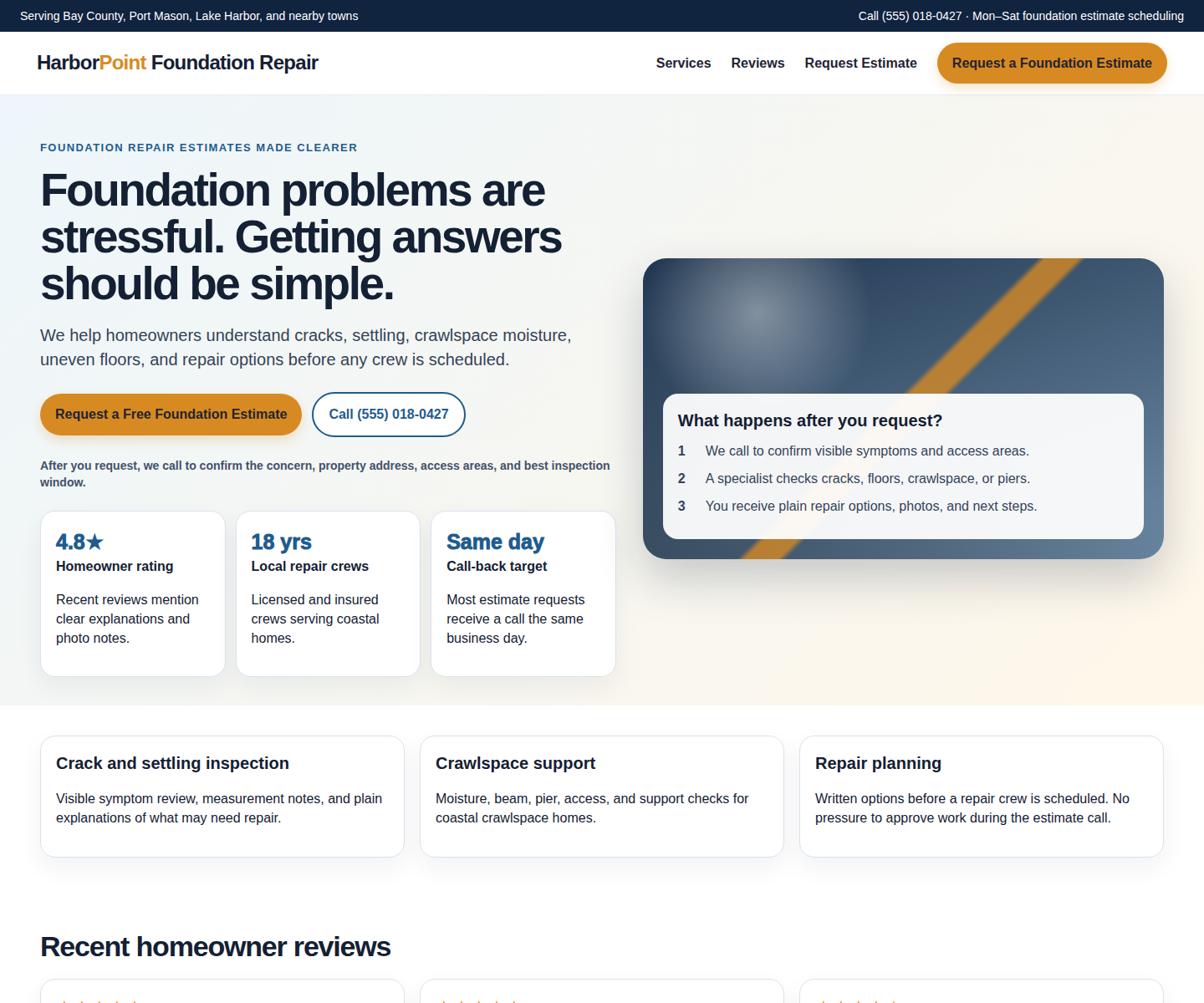
Visible evidence: foundation repair category, location box, Book Now, phone/contact path, rating/review reassurance, and foundation repair positioning. Readable top-of-page crop shown here; full-page screenshot is retained in the evidence file.
Mobile homepage
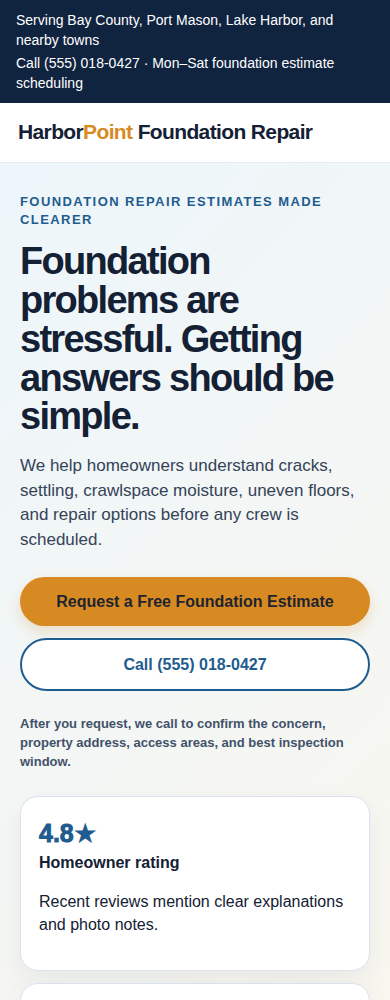
Visible evidence: Call Us, Book Now, Update location, and first-screen mobile decision area. The clipped review/rating line is a practical mobile confidence issue. Readable top-of-page crop shown here; full-page screenshot is retained in the evidence file.
Desktop services page
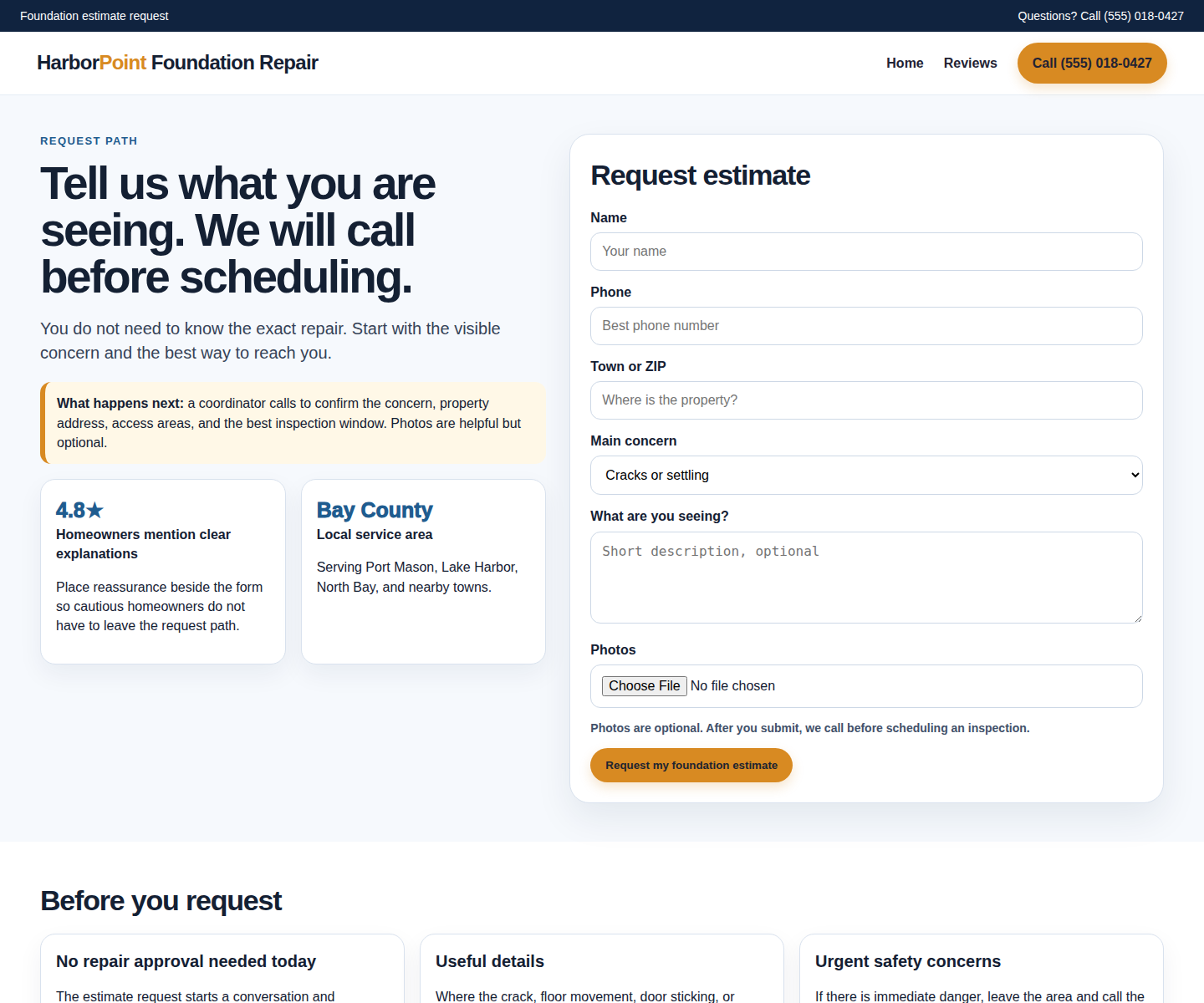
Visible evidence: Foundation repair Services page, local foundation repair service language, guarantee/reassurance, location/request action, and service context. Readable top-of-page crop shown here; full-page screenshot is retained in the evidence file.
Mobile services page
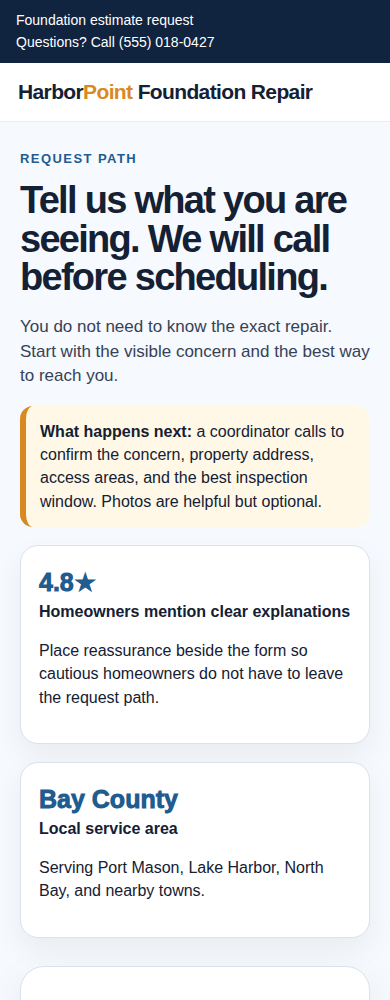
Visible evidence: mobile services flow and the amount of scrolling before detailed service reassurance appears. Readable top-of-page crop shown here; full-page screenshot is retained in the evidence file.
Final delivery scope
Work basis: public pages were checked from visible website evidence only. No forms were submitted, no phone call was made, no chat was opened, and no outreach was sent. This report does not guarantee calls, bookings, sales, revenue, rankings, legal disability-access compliance, review removal, rating improvement, or reputation repair. Findings are owner-facing plain-English notes based on what was visible at check time.
The report is intended to help the owner and website provider decide what to change first, how to verify it, and what to monitor next month. It is not a public ranking, customer behavior evidence, legal conclusion, or revenue forecast.